How much does Google Ads cost in the UK? (2026)

In this article
How much does Google Ads cost? There's no fixed price. You decide how much to spend each day and, on a Search campaign that bids for clicks, you pay when someone clicks your ad. A neighbourhood barber can start with a few pounds a day, while a dental clinic in central London may need far more, because it competes with more advertisers for the same search.
This guide explains how Google charges you, what sets the price of each click and how to work out a starting budget from your own numbers, rather than from averages for other industries. If you'd rather someone set up and watch the campaign for you, see how we run Google Ads for local businesses.
How much does Google Ads cost per month?
What you pay Google is the total of the clicks you get, up to a limit you set. The price of each click isn't fixed either. Google's help explains that your actual cost per click is often lower than your maximum bid, sometimes much lower, because in the auction you only pay what's needed to beat the ad of the competitor immediately below you.
That's why two shops on the same street can pay different prices for the same search. What you always control is the most you spend, and that comes down to your daily budget.
How does the Google Ads daily budget work?
In Google Ads you set an average daily budget for each campaign, and you can change it at any time. Google spreads that money across the month: on some days it spends less, on others more, depending on when people are searching. Google's help page on average daily budgets sets two limits you will never pay more than, for most campaigns:
- In one day: twice your average daily budget.
- In one month: 30.4 times your average daily budget (30.4 is the average number of days in a month).
| Average daily budget | Most in one day | Most in one month |
|---|---|---|
| £5 | £10 | £152 |
| £10 | £20 | £304 |
| £20 | £40 | £608 |
To turn a monthly figure into a daily one, divide by 30.4. If you want to spend no more than £300 a month, set about £9.87 a day. A day at double the spend is normal; the monthly cap still holds.
On top of that, Google adds a surcharge in some countries. For ads shown in the UK, a 2% UK DST fee is added to your invoice, and has been since 1 November 2020. If you spend £300 on clicks, expect about £6 more.
What decides the price of a click?
Every time someone searches, Google runs an auction between the advertisers who want to appear. To rank the ads it combines your maximum bid, the quality of your ad, how competitive that auction is and the context of the search. In practice, four things move what you pay:
- Competition: the more businesses bidding on 'emergency plumber' in your town, the more it costs to appear at the top.
- Ad quality: Google looks at how likely people are to click, how well the ad matches the search and the experience on your landing page.
- Location: you choose where your ads show. A sensible radius around your premises stops you paying for clicks from people who would never come.
- Schedule: you can show ads only when someone can answer the phone, so you don't pay for clicks nobody picks up.
To see how your ads are doing on quality, Google Ads shows a Quality Score from 1 to 10 for each keyword. Google is clear that it's a diagnostic tool and not an input in the auction, but its three parts tell you what to fix: the ad, the keyword or the page the click lands on.
How much should you spend on Google Ads to start?
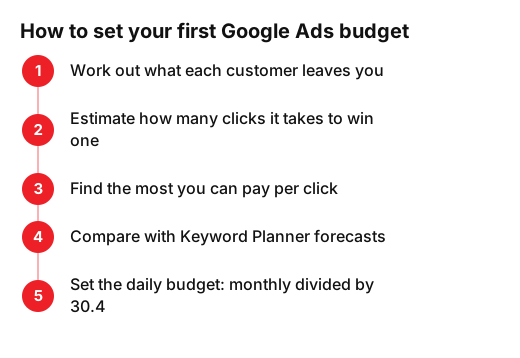
Start backwards: work out how much you can pay for a customer and still make money. Then look at how many clicks it takes to win one.
A round-numbers example for a plumber: each job leaves £90 of profit. Out of every 10 people who click, one calls, and out of every 3 calls, one becomes a job. That's about 30 clicks per job, so the plumber can pay up to £3 a click without losing money. Above that, every job from Google costs more than it earns.
Run the sums with your real figures. The free ROAS calculator shows what comes back for every pound you put into ads, and the break-even calculator shows how much you need to sell to cover your costs.
Then compare your limit with what clicks cost in your area. Keyword Planner gives forecasts of clicks and daily cost for your keywords based on your spending, using historical search data. To use it you must complete your account setup by entering your billing information. With all that, your first budget comes together in five steps:
Give the campaign a few weeks before you judge it. With only a few clicks a day, one very good or very bad week can be pure chance.
Google Ads costs that aren't on Google's invoice
The money for clicks is only part of the bill. Before you start, allow for these too:
- Time or management: someone has to build the campaign, add negative keywords, read the real search terms and adjust bids every week. You do it yourself or pay a professional, and that fee comes on top of what you pay Google.
- Landing page: if the click lands on a slow or confusing site, you still pay and nobody calls. If yours needs work, see what a website costs in the UK.
- Tracking: without counting calls, forms and bookings, you can't tell which keywords bring customers and which just spend.
- Tax: ask your accountant how VAT applies to your Google Ads invoices.
If your customers are local, pair your ads with your Google Business Profile. We explain how in our guide to local SEO pricing: it takes longer to pay off, but you don't pay for every visit.
Is Google Ads worth paying for?
It's worth it when each customer leaves you more than it costs to win them and you can look after them properly. It suits urgent searches (locksmith, plumber, emergency dentist) and services with a healthy margin. It suits you less if your margin is very thin or if nobody can answer when the calls come in.
This week you can do three things: work out what a customer leaves you, check Keyword Planner for your three main searches and decide a monthly cap you can afford while you learn. If you'd like a second opinion on your numbers, get in touch and we'll go through them with you.
Frequently asked questions
- Is there a minimum spend for Google Ads?
- There's no fixed fee. You choose the average daily budget for each campaign and can change it at any time. Start with a figure you can afford for a few weeks while you learn what works.
- Why did Google spend more than my daily budget?
- Because Google spreads your spend across the month. On a single day it can spend up to twice your average daily budget, but over the month you won't pay more than 30.4 times that figure on most campaigns.
- How much is a click on Google Ads in the UK?
- It depends on competition, the quality of your ad and landing page, and the context of the search. For your own case, check Keyword Planner forecasts for your searches and your area.
- Is Google Ads better than local SEO?
- They do different jobs. Google Ads gets you seen from day one and you pay per click; local SEO takes longer but doesn't charge per visit. Many local businesses use both.
Sources
- Google Ads, «Actual cost-per-click (CPC): Definition - Google Ads Help». support.google.com/google-ads/answer/6297?hl=en
- Google Ads, «About average daily budgets - Google Ads Help». support.google.com/google-ads/answer/6385083?hl=en
- Google Ads, «About Quality Score for Search campaigns - Google Ads Help». support.google.com/google-ads/answer/6167118?hl=en
- Google Ads, «About Keyword Planner forecasts - Google Ads Help». support.google.com/google-ads/answer/3022575?hl=en
- Google Ads, «Jurisdiction-specific surcharges - Google Ads Help». support.google.com/google-ads/answer/9750227?hl=en