Website migration SEO checklist: keep your rankings

In this article
A website migration is any move that changes where your pages live: a new domain, a new platform (Wix to WordPress, say), a new URL structure or a switch to HTTPS. Done badly, the pages Google knows stop working and the rankings you built go with them. Done well, Google carries those signals across to the new pages.
This checklist follows Google's own guide to site moves, plus what we check when we move a client's website. It works whether you do the move yourself or hire someone.
Does a website migration affect SEO?
Yes, for a while. Google says visibility in Search may fluctuate temporarily during the move, and that for medium-sized websites it can take a few weeks or more before it shows the new URLs instead of the old ones. That's normal. A drop that never recovers is not, and it almost always comes from missing redirects.
The good news is in the same guide: 301 and other permanent redirects don't cause a loss in PageRank. If every old page points to its new home, the links and history it earned move with it.
Before the move
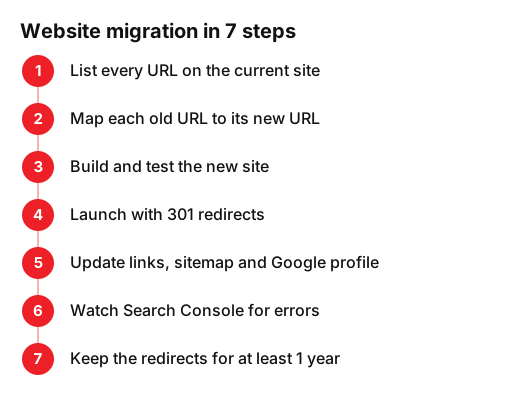
- List every URL on the current site. Your sitemap, your platform's page list and the Pages report in Search Console together catch most of them. Don't forget blog posts, old offers and PDFs.
- Note which pages bring visits and which have links from other sites. Those are the ones you can't afford to lose.
- Write a mapping: each old URL next to its new URL. Keep the same address wherever you can. The fewer URLs change, the safer the move.
- Decide what goes. A page with no new equivalent should return a 404 or 410 error, not redirect to the homepage.
- Build and test the new site on a test address that Google can't index.
- Carry over the page titles, descriptions and headings that already rank, instead of rewriting everything at once.
On launch day
- Switch on the 301 redirects: one old URL to one new URL.
- Test a sample of old URLs, starting with your most visited pages.
- Remove whatever kept the test site out of Google, such as a noindex tag or a robots.txt rule.
- Update internal links so they point straight to the new URLs, not through redirects.
- Submit the new sitemap in Search Console. If the domain changed, also use the Change of Address tool.
- Update your website link everywhere else: your Google Business Profile, social profiles, directories and your email signature.
What is a 301 redirect, and when do you use a 302?
A 301 tells browsers and Google that a page has moved for good. A 302 says the move is temporary. Google's guide to redirects explains why it matters: with a permanent redirect Google shows the new page in search results, with a temporary one it keeps showing the old one. For a migration you want 301s (or 308s), set up on the server.
| Redirect | What it tells Google | Use it for |
|---|---|---|
| 301 or 308 | Moved permanently: show the new URL | Migrations, merged pages, a new domain |
| 302 or 307 | Moved for now: keep showing the old URL | Short promotions, maintenance, tests |
Avoid redirect chains, where an old URL points to another old URL before reaching the new one. Each old address should go straight to its final page.
After the move: the first weeks
- Check Search Console every few days: the Pages report for new 404 errors, and Performance for clicks on the new URLs.
- Fix any old URL that returns an error by adding the missing redirect.
- Watch bookings, calls and contact forms, not only rankings.
- Keep the redirects. Google says to keep them for as long as possible, generally at least 1 year. After a domain move with the Change of Address tool, it asks for at least 180 days, and longer if the old URLs still get traffic.
- Keep the old domain registered and renewed, so links in old emails, posts and printed material still work.
The mistakes that cost rankings
- Changing everything at once. Google recommends doing big changes one at a time: move the domain first, then change the layout.
- Redirecting every old page to the homepage instead of to its real equivalent.
- Letting the old domain expire.
- Launching with the noindex tag from the test site still in place.
- Moving in your busiest weeks. If your trade is seasonal, Google suggests timing the move for a quieter period.
- Forgetting email. If your email runs on your domain, changing the domain's DNS without copying the mail records can stop email arriving.
Moving from Wix, Squarespace or WordPress
The steps are the same on every platform. Each platform builds its addresses in its own way, especially for blog posts and shop products, so moving between them usually changes those URLs. That's why the mapping matters most when you leave a website builder. Before you start, check that the new platform lets you set up 301 redirects. If it can't, it isn't ready for a migration.
Want a baseline first? Run your current site through our free website grader so you can compare before and after. If the site also needs a new look, see our website redesign service, and for budgets, what a new website costs in the UK.
Frequently asked questions
- How long does it take for SEO to recover after a website migration?
- Google says that for a medium-sized site it can take a few weeks or more before it shows the new URLs instead of the old ones, and longer for large sites. Some movement in that time is normal. A drop that lasts usually points to missing or wrong redirects.
- Do 301 redirects hurt SEO?
- No. Google states that 301 and other permanent redirects don't cause a loss in PageRank. What hurts is an old page with no redirect, or a redirect to an unrelated page such as the homepage.
- How long should I keep 301 redirects?
- For as long as possible, and generally at least 1 year, according to Google. After a domain change with the Change of Address tool, keep them at least 180 days, and longer if the old URLs still get visits.
- Can I change my domain and redesign my website at the same time?
- Google recommends doing big changes one at a time, for example moving to the new domain first and changing the layout afterwards. That way, if traffic drops, you know which change caused it.
- Will I lose my email if I move my website?
- Not if the mail records move with it. Email depends on your domain's DNS settings, so when you change host or DNS provider, copy the mail records exactly before you switch.
Sources
- Google Search Central, «Site moves and migrations». developers.google.com/search/docs/crawling-indexing/site-move-with-url-changes?hl=en
- Google Search Central, «Redirects and Google Search». developers.google.com/search/docs/crawling-indexing/301-redirects?hl=en
- Google Search Console Help, «Change of Address tool». support.google.com/webmasters/answer/9370220?hl=en