Estate agent website design: what it needs

In this article
- Why does an agent need its own website when it's on the portals?
- Which pages does an estate agent website need?
- One page per property, with the information buyers need
- The valuation page: where your instructions come from
- Area guides, the team page and reviews
- How fast does the site need to be on a phone?
- Make sure every enquiry reaches a person within minutes
- What does it cost and where do I start?
Good estate agent website design serves two people. The buyer or tenant who spotted a property on Rightmove and wants to know more, and the homeowner deciding which agent to instruct. That second person nearly always searches your name before picking up the phone, and what they find counts as much as your shop window on the high street.
This post is part of our estate agent marketing guide for local agencies. Here we focus on the website itself: which pages it needs, what to put on every listing, how to build a valuation page that brings in vendors and landlords, how fast it should be on a phone, and how to make sure every enquiry reaches a person within minutes.
Why does an agent need its own website when it's on the portals?
Rightmove, Zoopla and OnTheMarket bring you applicants for a specific property. Your website brings you trust in the agency. When a vendor compares two or three local agents, they look at who the team are, what other sellers say, what you have sold on their street and how easy you are to reach. None of that fits in a portal listing.
A portal listing also disappears when the property sells or you stop paying, and the portal decides how it looks. The pages on your own site are yours: they stay live, they can rank in Google for your area names and they add up over the years. We cover how to get them found in our post on estate agent SEO.
Which pages does an estate agent website need?
You don't need a huge site. These pages cover what buyers, tenants, vendors and landlords look for:
| Page | What it is for |
|---|---|
| Home | Say in one line which area you cover and whether you do sales, lettings or both, with two buttons: search properties and book a valuation. |
| Property search | Filter by sale or rent, area, price and bedrooms. Few filters, and they must work well on a phone. |
| One page per property | Each home gets its own web address, photos, details and a button to book a viewing. |
| Book a valuation | The form for owners thinking of selling or letting. This is the page that wins instructions. |
| Area guides | One page per neighbourhood or postcode you cover: what it is like, what sells, what you have sold there. |
| Meet the team | Real photos, names, the patch each person covers and a direct line. |
| Reviews | What vendors, landlords and buyers say, ideally from your Google Business Profile. |
| Contact | Branch address, opening hours, map, phone and WhatsApp. |
One page per property, with the information buyers need
The listing page gets more visits than anything else on the site. Every property should have its own, with a clean address (for example /for-sale/3-bed-terrace-high-street-ref-1234) and the details up front:
- Asking price or rent, council tax band and tenure. These are Part A of the material information guidance from National Trading Standards, so leave nothing as "call for details".
- Property type, number of rooms, utilities and parking, which the same guidance lists as Part B for every property.
- Anything that only applies to some homes, such as flood risk or restrictive covenants (Part C).
- The EPC rating, floor plan, 15 to 25 good photos and, if you have one, a short video tour.
- A rough location on the map if the vendor doesn't want the exact address shown.
- A reference number and two buttons that stay on screen: "Book a viewing" and "Message us on WhatsApp".
The same National Trading Standards update reminds agents that they already have a legal duty not to leave material information out of a listing. Your website templates should have a field for each item, so nothing depends on someone remembering to type it into the description.
When a property sells or lets, don't delete the page. Mark it "Sold STC" or "Let agreed" and link to similar homes. That page shows local owners that you sell on their street, and you keep the visits it was already getting.
The valuation page: where your instructions come from
No instructions, no stock. The valuation page is how you win vendors and landlords online, so put it in the menu, on the home page and at the end of every area guide. Ask only for what you need to book the appointment: address, property type, whether they want to sell or let, when, and a phone number.
You don't need an instant online price. A figure worked out from postcode averages is often wrong, and the point is to get into the house and meet the owner. Copy you can paste onto that page:
- Headline: "What is your home in [area] worth?"
- Subheading: "Get a written valuation within 48 hours, based on what we have sold on your street. No obligation."
- Button: "Book my valuation"
- Under the button: "[Agent name], who covers your area, will call you."
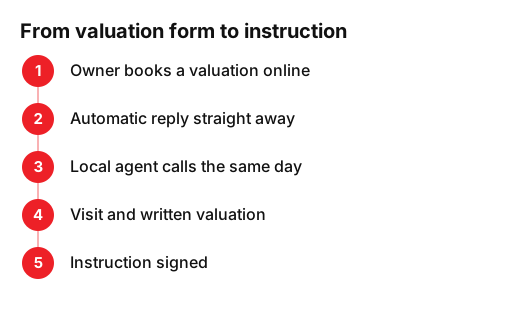
The route from a form to a signed instruction should be short and the same every time:
Area guides, the team page and reviews
Area guides are the pages that rank best for a local agent, because the portals don't write them. Do one per neighbourhood or postcode: typical homes, the streets people ask for, schools, transport, what you have sold there in the past year and a photo of you on the high street. Finish with a button to the valuation page.
On the team page, skip the stock photos. Show each person with their name, the patch they cover, how long they have worked locally and a direct number. People instruct people.
Reviews persuade, with one catch. Google's review snippet guidelines say that when a business controls the reviews about itself, its pages are ineligible for star ratings in search results. Show your Google reviews on the site for visitors, without expecting stars in Google. What does help is marking up your branch details as a RealEstateAgent with our free schema markup generator.
How fast does the site need to be on a phone?
Plenty of people browse property on their phone, often on the train or in a lunch break. Google publishes clear targets: its guide to Core Web Vitals says the main content should load within 2.5 seconds and the page should respond to a tap in under 200 milliseconds. On an agency site, the usual culprits are uncompressed photos and maps that all load at once.
To see where you stand, run a listing page through our free website grader, since that is your heaviest page. If it is slow, start by cutting the size of the photos.
Make sure every enquiry reaches a person within minutes
The most common problem has nothing to do with design. It is what happens after the form: the message lands in a shared inbox that someone checks in the evening. By then the applicant has rung another agent about the same house.
- Send every form to the duty negotiator's phone as well as to email.
- Set an automatic reply that confirms you have it and says when you will call.
- Add a WhatsApp button to every listing with the property reference already filled in.
- Be clear about weekends, when most people search: who answers and by when.
Auto-reply you can copy: "Thanks for your interest in ref. [1234]. We will call you today before [time]. If it is easier, reply with the best time to talk." There are more examples in our guide to the auto-reply email for business.
What does it cost and where do I start?
The price depends on how many pages you need and whether listings feed in from your property software or are added by hand. We break it down in how much a website costs in the UK. If you already have a site, here is what to check this week:
- Open three listings on your phone and check price, council tax band, tenure and EPC.
- Fill in your own valuation form and time how long a reply takes.
- Look for sold listings you deleted and decide whether they should have stayed as "Sold STC".
- Pick one area and write its guide with what you know and the portals don't say.
If you would rather we handled it, our web design for local businesses includes listing pages, a valuation page and area guides, built to rank in your patch.
Frequently asked questions
- Does an estate agent need its own website if it lists on Rightmove and Zoopla?
- Yes. The portals bring applicants for each property, but vendors and landlords deciding who to instruct search your name and compare agents. Your website shows your team, what you have sold nearby and your reviews, and it brings in valuation requests directly.
- What should a property listing page include?
- Price or rent, council tax band and tenure, property type, rooms, utilities and parking, the EPC rating, good photos, a floor plan, a rough map location, a reference number and buttons to book a viewing or send a WhatsApp message.
- Should I offer an instant online valuation?
- Usually not. A figure based on postcode averages is often wrong and gives the owner less reason to meet you. Promise a written valuation within a day or two and call to book a visit.
- Can reviews on my website give me stars in Google?
- No. Google does not show star ratings in search results for reviews a business publishes about itself on its own site. Show them on the site for visitors and look after your Google Business Profile, which is where the stars appear.
Sources
- National Trading Standards, «Full material information guidance published». www.nationaltradingstandards.uk/news/full-material-information-guidance-published/
- Google Search Central, «Review Snippet (Review, AggregateRating) Structured Data». developers.google.com/search/docs/appearance/structured-data/review-snippet
- Google Search Central, «Understanding Core Web Vitals and Google search results». developers.google.com/search/docs/appearance/core-web-vitals