What is local SEO? A complete guide

In this article
- What is local SEO marketing? An example
- The Google Maps local pack vs organic results
- Google's 3 local ranking factors: relevance, distance and prominence
- Google Business Profile: your shop window on the map
- Reviews: the part of prominence you control most
- NAP: the same name, address and phone number everywhere
- Local content on your website
- AI assistants: a new door into local search
- Who needs local SEO?
- Can you do local SEO yourself?
- What to do this week
Local SEO is the work that gets your business in front of people nearby who are searching for what you sell: "hairdresser in Islington", "emergency plumber" or "bakery open now". It brings together three things: your Google listing, what others say about you online, and a website that makes clear what you do and where. If you have premises customers visit, or an area you cover, local SEO decides whether they call you or the competitor down the road.
This guide is the full map. We explain how local results work according to Google's own documentation, which parts are in your hands and what to do this week. In each section we point you to the guide in this series that goes deeper. If you only want the task list, jump straight to our local SEO checklist for ranking on Google Maps.
What is local SEO marketing? An example
Picture a neighbourhood bakery. Someone three streets away searches "gluten-free bread" on their phone. Google shows a map with a handful of businesses and, below it, links to websites. Local SEO is getting that bakery into both places: on the map, with a complete listing, photos and good reviews, and in the links, with a page about its gluten-free bread and its area.
Traditional SEO tries to rank a website across a whole country. Local SEO works within a set radius around you and for searches with an intent to buy now. That is why your Google listing, address, opening hours and real customer reviews carry so much weight.
The Google Maps local pack vs organic results
Google puts it plainly: when a customer searches for a business or place near them, they'll find local results on Google Maps and Search. In practice, a local search shows two separate areas that follow different rules:
| Local pack (map) | Organic results | |
|---|---|---|
| What shows | A map with a handful of business listings | Links to web pages |
| Where it comes from | Your Google Business Profile | Your website |
| What moves it | Relevance, distance and prominence of the listing | Content, links and technical quality of the site |
| What you get | Calls, directions and walk-ins straight away | Website visits and bookings |
You don't have to choose. A good website supports your listing, and a good listing sends people to your website. Ideally you show up in both. No website yet? Start with what a website costs in the UK.
Google's 3 local ranking factors: relevance, distance and prominence
Google publishes a help article called "Tips to improve your local ranking on Google". It sums up that local results are mainly based on relevance, distance and popularity. In the detail, it calls the third factor prominence. Many guides just repeat the three words; we prefer Google's exact definitions:
- **Relevance**: how well a Business Profile matches what someone is searching for. You improve it with complete, detailed business info.
- **Distance**: how far each business is from the customer who's searching. If the customer doesn't share where they are, Google uses what it knows about their location.
- **Prominence**: how well known a business is. Google mentions how many websites link to your business and how many reviews you have.
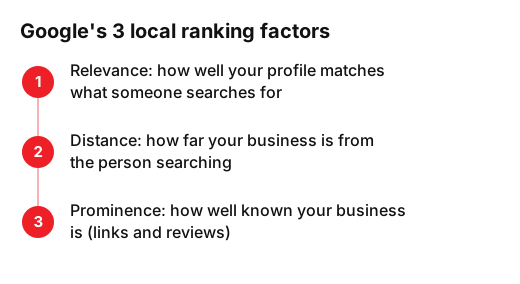
You can't change distance without moving. Relevance and prominence are yours to work on. Google adds an important warning: there's no way to request or pay for a better local ranking. Anyone promising "the top spot on Maps for a fee" is selling you a fantasy. To see how each factor turns into concrete signals, and the common mistakes that sink them, read our guide to local SEO ranking factors and the errors that ruin them.
Google Business Profile: your shop window on the map
Your Google listing (formerly Google My Business) is the centrepiece. Google says businesses with complete and accurate info are more likely to show up in local search results. Check these first:
- Verify the profile. It tells Google you're authorised to represent the business.
- Pick the primary category that best describes what you do. A dental clinic should be "dentist", not "medical centre".
- Check your opening hours, including special hours for bank holidays.
- Add real photos: shopfront, interior, your team at work, products.
- Fill in useful attributes: accessibility, parking, Wi-Fi, appointments.
A well-kept profile isn't a one-off job. Check every month that everything is still current, especially after a change of hours or phone number.
Reviews: the part of prominence you control most
Google says more reviews and positive ratings can help your local ranking, and that replying shows you value customer feedback. For a hairdresser or a garage, reviews are also the first thing a customer reads before calling.
- Ask for the review right after a good job, with a direct link or a QR code at the till.
- Reply to every review, including negative ones, calmly and with a fix.
- Never buy reviews or trade them for discounts. It breaks Google's rules and can cost you the listing.
NAP: the same name, address and phone number everywhere
NAP stands for name, address and phone number. They should match on your profile, your website, your social accounts and every directory you appear in. Google asks that your profile name reflect your real-world business name, as used consistently on your storefront, website, stationery, and as known to customers. So no adding "best plumber in Manchester" to the name.
The usual slip-ups are small: an old phone number in a directory, "Rd" in one place and "Road" in another, an address from before you moved. To find them without checking a hundred sites by hand, use one of the best local SEO tools we compared, many with a free tier.
Local content on your website
Your website strengthens relevance. Google understands what you do and where more easily when your site says it clearly. The basics:
- One page per main service, naming the area or town you serve. For example, "teeth whitening in Leeds".
- Your name, address and phone number in the footer of every page, exactly as on your profile.
- An embedded map, opening hours and directions.
- Local business structured data, so search engines read your details without errors.
- Your own photos and real examples from local customers.
Links from websites around you count towards prominence too: your local traders' association, a local newspaper, a supplier or an event you sponsor.
AI assistants: a new door into local search
People can now ask an AI assistant "where can I get a haircut nearby?" or "which dentist opens on Saturdays?". In Google, AI Overviews and AI Mode build on the same foundations as normal search: Google says there are no additional requirements to appear in them, and its recommendations include checking that your Business Profile information is up to date.
In other words, solid local SEO is the groundwork for AI recommendations too. To go a step further with ChatGPT and other assistants, read what GEO is and how to show up in ChatGPT.
Who needs local SEO?
Any business that serves customers in a specific area. There are two broad types:
- **Businesses with premises**: hairdressers, dental clinics, bakeries, restaurants, gyms, shops. The customer comes to your address.
- **Service-area businesses**: plumbers, electricians, cleaners, removals. You go to the customer and can hide your address on the profile.
If you work at customers' homes, the same Google guidelines say your service area shouldn't extend farther than about 2 hours of driving time from where your business is based. And if you do both, like a garage that also offers roadside help, you can show your address and set a service area. Hospitality has its own priorities, such as menus, bookings and food photos, which we cover in our guide to restaurant SEO.
Can you do local SEO yourself?
Yes, a good part of it. Any owner can handle the profile, reviews and NAP with a couple of hours a month. Help is usually needed with the website, structured data, local links and measuring results. To decide with a clear head, weigh up hiring a local SEO agency or doing it yourself, and see what drives the budget in how much local SEO costs.
We work 100% online with businesses in the UK, Germany, Switzerland, Spain and the US. If you'd rather we handled it, here is our local SEO and AI visibility service.
What to do this week
- Monday: search for your business on Google Maps as a customer would and note what you see and what's missing.
- Tuesday: verify your profile and fix the category, hours and phone number.
- Wednesday: upload five new, real photos.
- Thursday: ask today's customers for a review and reply to any you haven't answered.
- Friday: check that your name, address and phone number match on your website, social accounts and two directories.
If you'd like us to look at your case, tell us about your business and the area you cover and we'll tell you where to start.
Frequently asked questions
- Can I pay Google to rank first on Google Maps?
- No. Google says there's no way to request or pay for a better local ranking. Google Ads are a separate thing: they're labelled as sponsored and stop showing when you stop paying.
- Do I need a website if I already have a Google Business Profile?
- It helps a lot. The profile gets you on the map, but a website strengthens relevance, lets you appear in organic results and is where customers book or buy.
- Does local SEO work if I don't have premises open to the public?
- Yes. If you go to customers, you can set up a service-area Business Profile, hide your address and list the areas you cover.
- How long does local SEO take to work?
- Google gives no timeline. Fixing your profile and NAP is quick; prominence, built through reviews and links, grows month by month. Consistency is what counts.
Sources
- Google (Google Business Profile Help), «Tips to improve your local ranking on Google». support.google.com/business/answer/7091?hl=en
- Google (Google Business Profile Help), «Guidelines for representing your business on Google». support.google.com/business/answer/3038177?hl=en
- Google Search Central, «AI Features and Your Website». developers.google.com/search/docs/appearance/ai-features?hl=en
- Google Business Profile (YouTube), «Improve Your Local Ranking on Google». www.youtube.com/watch?v=tI_o6TmPiAo