Local SEO ranking factors and 10 common mistakes

In this article
Local SEO ranking factors are the signals Google uses to decide which businesses to show on Google Maps and in the map on the results page when someone searches nearby. If you are still unsure what local SEO is and how it works, start there. Here we get practical: what Google officially says, which parts you can control, and the mistakes we see every week at hairdressers, plumbers, bakeries and dental clinics.
The idea is simple. Every mistake on this list damages one of three factors. Once you know which factor you are hurting, you know what to fix first.
What are the three main local SEO ranking factors?
Google explains it in the Business Profile help centre. The first thing it makes clear is that there's no way to request or pay for a better local ranking. Ads are a separate channel with their own rules: see what Google Ads really costs. It then says local results are mainly based on three factors:
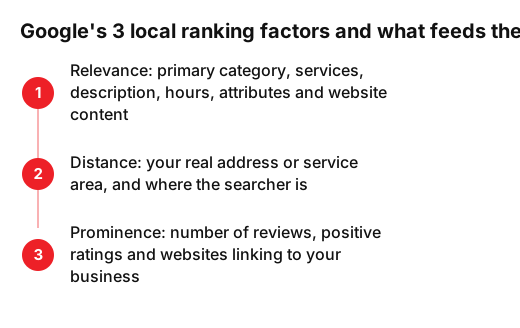
- Relevance: how well your Business Profile matches what someone is searching for. Google asks for complete and detailed information so it can understand your business.
- Distance: how far your business is from the person searching. If they don't share their location, Google uses what it knows about where they are.
- Prominence: how well known your business is. Google says this is also based on how many websites link to your business and how many reviews you have, and that more reviews and positive ratings can help your local ranking.
A detail few people mention: the current version of the page sums up the three factors as relevance, distance and popularity, while the section itself is still called prominence. The definition stays the same: how well known your business is, online and offline.
The official Google Business Profile channel has a video of just over a minute that sums it up. At 0:19 it names the three factors, then gives practical tips: complete details, correct opening hours including holidays, photos and verification.
Which factor can you actually control?
You don't choose distance. It depends on where your premises are and where the searcher is. A dental clinic in the town centre won't rank first for someone searching from another neighbourhood with ten clinics closer by. What you can work on is relevance and prominence, and not losing ground through mistakes with your address.
| Factor | What feeds it | Can you control it? |
|---|---|---|
| Relevance | Primary category, services, description, hours, attributes and your website content | Yes, almost all of it |
| Distance | Your real address or service area, and where the searcher is | Barely: keep your address correct |
| Prominence | Reviews and ratings, and other websites linking to your business | Yes, over time |
Mistakes that hurt relevance
- 1. The wrong primary category. A hairdresser who picks a broad category because it sounds bigger competes worse for 'hairdresser near me'. Google's guidelines say to choose the fewest categories possible and not to use them as keywords. Pick the one that completes the sentence 'this business IS a…'.
- 2. A keyword-stuffed business name. 'Smith Plumbing Emergency 24h Cheap London' may look like a shortcut, but Google says unnecessary information in your name isn't permitted and could get your profile suspended. Use the name on your sign, website and invoices.
- 3. Missing hours or no holiday hours. Google asks for your regular opening hours and lets you set special hours for holidays or events. A bakery that closes for two weeks in August and doesn't say so sends customers to a locked door.
- 4. A thin website with no local page. If your site is a single page with a logo and a phone number, Google has little to work out what you do and where. Create a page for each main service that mentions your town or area, shows the same address and phone number as your profile, and uses real photos. We walk through it in our step-by-step guide to ranking on Google Maps.
Mistakes with your address and details
- 5. Using a virtual office. If you rent a mailing address but don't work from it, Google says that location isn't eligible for a Business Profile. If you are a plumber who visits customers, set a service area and hide your address, as Google recommends.
- 6. Duplicate listings. An old listing from before you moved, one a former employee set up, another created by a directory. Google says there should only be one profile per business, because duplicates cause problems with how your information shows on Maps and Search. Search your name and phone number on Google Maps, claim the listings that are yours and remove or report the rest.
- 7. Different name, address and phone number everywhere. Your profile says '5 High St', your website says '5 High Street, Unit 2' and your Facebook page still has the old number. Google asks you to represent your business as it is known in the real world and to use a local phone number rather than a central call centre line. Write your details down once and copy them exactly everywhere.
Mistakes that hurt prominence
- 8. Few reviews or none at all. Google is clear that more reviews and positive ratings can help your local ranking. Ask for the review straight after the service, with a direct link or a QR code at the till. You'll find practical ideas in our article on how to get Google reviews without breaking the rules.
- 9. Not replying to reviews. Google points out that positive reviews and helpful replies can help your business stand out. Reply to all of them, including the bad ones: thank, clarify and offer a fix. Five minutes a day is enough.
- 10. Buying reviews or offering something in return. A discount or a free service in exchange for five stars. The Google Maps content policy bans offering incentives such as payment, discounts or free goods and services for reviews, and that content is removed.
What to do this week
- Monday: open your Business Profile and check the primary category and the name. Use our list of 7 things to check on your Google Business Profile as a checklist.
- Tuesday: add bank holidays and closures for the next three months.
- Wednesday: search your phone number on Google Maps to spot duplicate listings.
- Thursday: make your name, address and phone number identical on your website, social profiles and directories.
- Friday: reply to every pending review and ask three happy customers for a review.
Every sector has its quirks. A restaurant leans heavily on photos, menus and kitchen hours, which we cover in our article on local SEO for restaurants. An estate agency lives on its area and property pages instead: see SEO for estate agents. If you'd rather we review your profile and website with you, have a look at how we support local SEO.
Frequently asked questions
- Can I pay Google to rank higher on Google Maps?
- Not in the local results. Google says there's no way to request or pay for a better local ranking. Advertising is a separate channel and doesn't improve your position in those results.
- What is the most important local SEO ranking factor?
- Google doesn't publish how much each factor weighs. Distance often decides, but you can't control it. Among the things you can control, start with what Google names in its own tips: complete and accurate information, your business category and reviews.
- Do keywords in my business name help?
- It may look like a shortcut, but Google doesn't allow unnecessary information in your name and could suspend your profile. Use your real name, the one on your sign.
- Can I rank in a town where I have no premises?
- Distance matters a lot, and a virtual office isn't eligible for a Business Profile. If you travel to customers, set a service area and build relevance with local pages on your website.
Sources
- Google, «Tips to improve your local ranking on Google - Google Business Profile Help». support.google.com/business/answer/7091?hl=en
- Google, «Guidelines for representing your business on Google - Google Business Profile Help». support.google.com/business/answer/3038177?hl=en
- Google, «Prohibited & restricted content - Maps User Generated Content Policy Help». support.google.com/contributionpolicy/answer/7400114?hl=en
- Google Business Profile (YouTube), «How to improve your local ranking on Google». www.youtube.com/watch?v=WpCeu4ezaeI